
How to Replace Filters and Understand Filter Alerts for HVAC, Air Purifiers & Refrigerators

Regular filter maintenance is an important part of keeping household systems operating efficiently while maintaining cleaner indoor air and water quality. Filters in HVAC systems, air purifiers, and refrigerators are designed to capture dust, allergens, debris, and contaminants that can affect both system performance and overall home comfort. Over time, these filters become clogged and less effective, which can reduce airflow, restrict water flow, increase energy usage, and place unnecessary strain on appliances and equipment.
Understanding when and how to replace filters can help extend the lifespan of your systems, improve energy efficiency, and support healthier living conditions. Many modern appliances now include filter alerts, indicator lights, or smart notifications that remind homeowners when maintenance is needed. Learning how these filter alerts work and how to properly replace different types of household filters can help ensure your appliances continue performing at their best year round.
Understanding Filter Alerts
What Are Filter Alerts?
Filter alerts are notification systems built into appliances and household equipment to remind homeowners when a filter needs to be inspected, cleaned, or replaced. Commonly found in HVAC systems, air purifiers, and refrigerators, these alerts help maintain system efficiency, improve air and water quality, and prevent equipment damage caused by clogged filters. Depending on the system, filter alerts may work through simple time based reminders, runtime tracking, reduced airflow or water flow detection, or advanced technologies like RFID chips in smart refrigerator filters. By notifying users before filters become excessively dirty, these alerts help reduce energy costs, support healthier indoor environments, and extend the lifespan of household equipment.
Common Types of Filter Alerts
HVAC Systems
- Thermostat reminders
- Smart HVAC notifications
- Indicator lights
Air Purifiers
- Filter replacement indicators
- App-based alerts
Refrigerators
- Water filter replacement lights
- Display panel warnings
Signs a Filter Needs Replacement Even Without an Alert
- Reduced airflow
- Dust accumulation
- Unpleasant odors
- Increased energy bills
- Poor water flow
Why You Should Not Ignore Filter Alerts
- Reduced efficiency
- Higher operating costs
- Poor indoor air quality
- Potential equipment damage
- Shortened system lifespan
How Often Should Filters Be Replaced?
HVAC Filters
- General Schedule: Homeowners are typically recommended to replace air filters every three months.
- Factors for Frequent Changes: You should consider replacing filters more often (less than every three months) if you have multiple pets, live with immunocompromised individuals, are highly susceptible to allergens, or reside in a dry, dusty region.
- Usage-Based Reminders: Smart thermostats may provide reminders based on the actual runtime of the system rather than just a set time; for example, reminders may occur more frequently during a very cold winter when the heating runs often.
Air Purifier Filters
While the provided sources mention that different indicators exist for prefilter maintenance, HEPA replacement, and carbon replacement, they do not explicitly list the 6–12 month or 3–6 month intervals mentioned in your query. The sources do note:
- Timer-Based Alerts: Most air purifier filter lights are timers, not sensors, and should be treated as reminders to inspect the filter.
- Performance Checks: If airflow is strong and the filter looks clean upon inspection, it may not need immediate replacement even if a timer light is on.

Image Credit: Danby
Refrigerator Water Filters
- General Schedule: A six-month interval is commonly referenced in relation to indicator light timed functions.
- Usage Indicators: The filter cartridge must be replaced when the indicator light turns red or if you notice a decrease in the flow of water to the dispenser or icemaker.
- Automatic Resets: Some modern filters use RFID chips to monitor status and automatically reset the reminder when a new filter is installed.
How to Replace HVAC Air Filters
Replacing your HVAC air filter regularly is one of the simplest and most important maintenance tasks for improving indoor air quality, maintaining system efficiency, and protecting heating and cooling equipment from unnecessary strain. A clean filter allows proper airflow throughout the system, while a clogged filter can increase energy costs, reduce performance, and potentially damage HVAC components over time.
Tools and Materials Needed
Before beginning, gather the following items:
- Replacement HVAC air filter
- Gloves (optional)
- Vacuum or cloth for cleaning dust around the filter area
Step-by-Step Instructions
Step 1: Turn Off the HVAC System
For safety, turn off the heating or cooling system before removing the filter. This prevents dust and debris from being pulled into the system while the filter compartment is open and reduces the risk of damaging HVAC components.
Step 2: Locate the Filter
HVAC filters are commonly located in one of the following areas:
- Inside the return air vent on a wall or ceiling
- In the furnace compartment
- Inside the air handler unit near the blower system
Refer to the HVAC owner’s manual if you are unsure where the filter is installed.
Step 3: Remove the Old Filter
Carefully slide out the old filter and inspect it for dust, dirt, and debris buildup. Before discarding it, look for the airflow direction arrow printed on the side of the filter frame. This arrow indicates the correct installation direction and should be noted before inserting the new filter.
If the filter appears heavily clogged or discolored, it likely restricted airflow and reduced system efficiency.
Step 4: Insert the New Filter
Check that the replacement filter matches the correct size listed on the old filter or HVAC system label. Slide the new filter into place while making sure the airflow arrows point in the proper direction, typically toward the furnace or air handler.
A properly installed filter should fit securely without gaps around the edges.
Step 5: Restart the System
Once the new filter is installed, close the access panel or vent cover and turn the HVAC system back on. Verify that airflow from vents feels normal and that the system is operating properly without unusual noises or reduced circulation.

Image Credit: TOSOT
How to Reset HVAC Filter Alerts
After replacing the filter, many HVAC systems or thermostats require the filter alert to be reset manually.
Thermostat Reset Process
Basic thermostats often include a filter reset button or menu option. Navigate to the maintenance or filter settings and select “Reset Filter Reminder” after installation.
Smart Thermostat Reset Options
Many modern air conditioners and smart climate control systems now include built in filter reminder technology designed to simplify maintenance and improve long term performance. These systems can notify users when filters need to be cleaned or inspected through display alerts, indicator lights, or connected app notifications. Some models also allow users to manually reset filter reminders after maintenance directly through the control panel or smart settings menu.
Examples of air conditioners with filter reminder features include:

LG LW2422IVSM White Window Air Conditioner | Shop Appliances
Features a built in Filter Check Reminder that alerts users when it is time to inspect and clean the air filter for continued performance and airflow efficiency.

GE AWGH12WWF White Window Air Conditioner | Shop Appliances
Includes a Filter Reminder system that notifies users when the filter requires cleaning, helping maintain optimal cooling performance and air circulation.

Friedrich KCVS12B30A Kuhl White Window Air Conditioner | Shop Appliances
Equipped with a washable air filter and Check Filter Reminder designed to simplify maintenance while supporting improved indoor air quality and airflow management.

Frigidaire FHWW104TE1 White Window Air Conditioner | Shop Appliances
Features a built in Clean Filter Alert that reminds users when filter maintenance is needed to keep the unit operating efficiently.
These filter reminder features can help extend the life of the air conditioner, improve indoor comfort, and ensure the system continues operating at peak efficiency with routine maintenance.
Manufacturer-Specific Instructions
Reset procedures vary depending on the HVAC brand and thermostat model. If the alert does not clear automatically, consult the owner’s manual or manufacturer support documentation for exact instructions.
How to Replace Air Purifier Filters
Replacing air purifier filters regularly is essential for maintaining clean indoor air, improving system performance, and ensuring the purifier continues to capture dust, allergens, odors, and airborne particles effectively. Over time, filters become clogged with contaminants, which can reduce airflow and decrease purification efficiency. Most air purifiers use a combination of different filter types, each designed to target specific pollutants.
Types of Air Purifier Filters
Air purifiers commonly use one or more of the following filter types:
- HEPA Filters: Designed to capture fine airborne particles such as dust, pollen, pet dander, and allergens.
- Activated Carbon Filters: Help remove odors, smoke, cooking smells, and volatile organic compounds (VOCs).
- Pre-Filters: Capture larger particles like hair and lint before they reach the main filter, helping extend overall filter life.
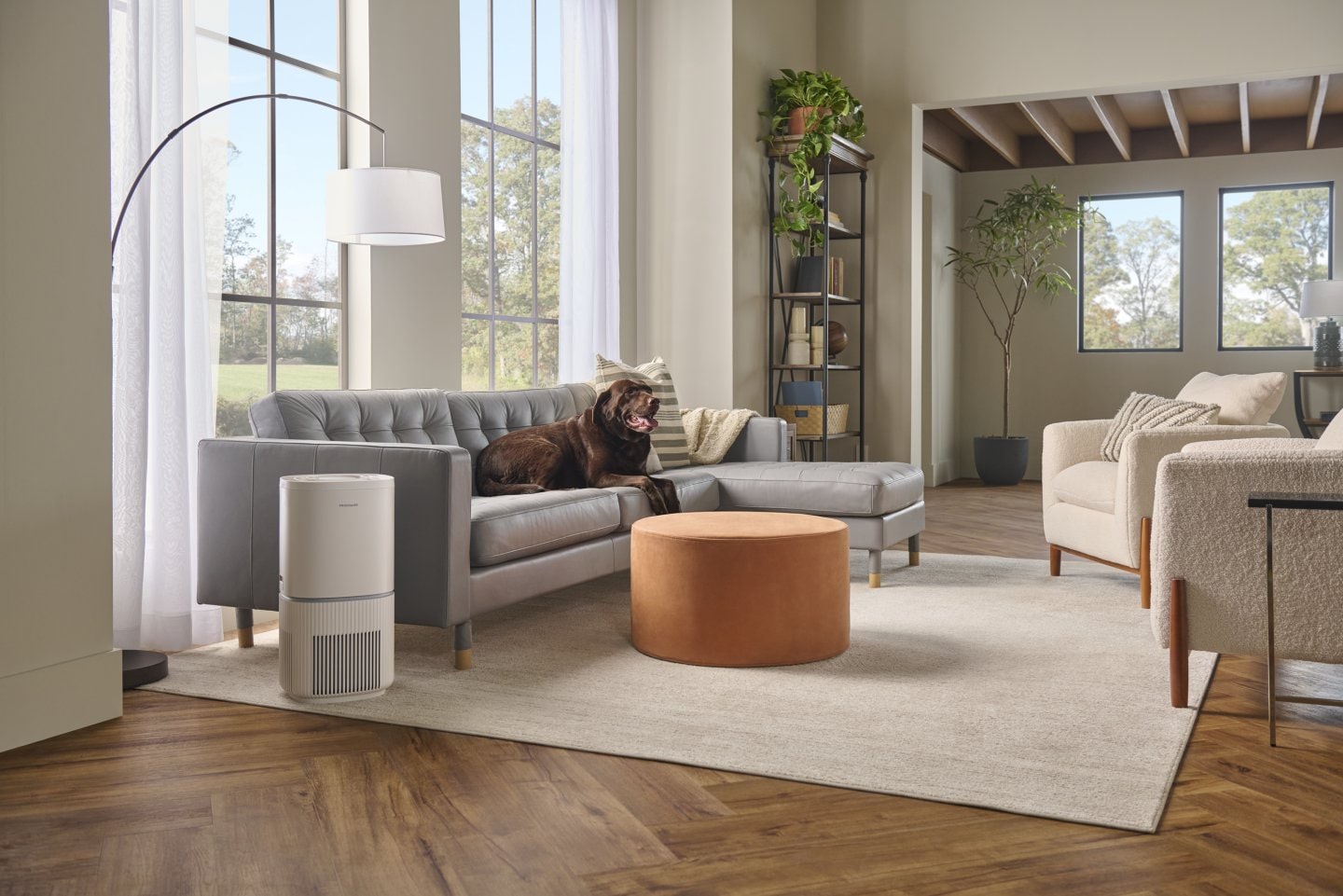
Image Credit: Frigidaire
Replacement Steps
Step 1: Power Off the Unit
Before replacing the filters, turn off and unplug the air purifier to ensure safe handling and prevent the fan from operating while the unit is open.
Step 2: Open the Filter Compartment
Locate the filter access panel, which is usually found on the back, side, or bottom of the purifier. Open the compartment according to the manufacturer’s instructions.
Step 3: Remove Used Filters
Carefully remove the old filters from the unit. Some filters may contain significant dust and debris buildup, so avoid shaking them indoors. Check whether the filters are disposable or washable, as some pre-filters can be cleaned and reused.
Step 4: Install New Filters
Insert the new filters into the purifier in the correct order and orientation. Many filters include airflow arrows or labels to guide installation. Make sure the filters fit securely without gaps.
Using manufacturer-approved replacement filters is recommended to maintain proper filtration performance.
Step 5: Close and Restart the Unit
Close the filter compartment securely, plug the unit back in, and power it on. Confirm that the purifier is operating normally and that airflow has improved after the replacement.
Resetting Air Purifier Filter Alerts
After installing new filters, many air purifiers require the filter reminder or indicator light to be reset manually.
Manual Reset Button
Some models include a dedicated reset button that must be pressed and held for several seconds until the filter light turns off.
App Reset Process
Many modern smart air purifiers now include app connected maintenance features that make it easier to monitor air quality, track filter life, and reset filter alerts directly from a mobile device. Depending on the model, users may receive notifications when filters need cleaning or replacement, along with real time air quality updates and maintenance reminders through the companion app.
Examples of smart air purifiers with app based filter monitoring and reset features include:

Frigidaire FHAP1040A1 10" White Air Purifier | Shop Appliances
Features app integration with remote control access, scheduling functions, air quality monitoring, and filter life tracking through connected smart controls.

LG AS601HBB0 13" White Air Purifier | Shop Appliances
Includes built in filter notification alerts that remind users when it is time to replace the filter to help maintain peak purification performance.

Electrolux EHAW4010AG 13" Gray Air Purifier | Shop Appliances
Equipped with an RFID enabled filter that tracks filter usage and sends replacement alerts through both the unit display and companion app.

Frigidaire FHAP2040A1 11" White Air Purifier | Shop Appliances
Offers Wi Fi connectivity for filter life tracking, scheduling, air quality monitoring, and app based smart control features.
These smart maintenance systems help simplify filter management while ensuring air purifiers continue operating efficiently and delivering cleaner indoor air.
Timer Reset Procedures
Many air purifier alerts are based on operating time rather than actual filter condition. Resetting the timer restarts the countdown until the next recommended inspection or replacement interval. Always consult the manufacturer’s instructions for the correct reset process for your specific model.
How to Replace Refrigerator Water Filters
Replacing your refrigerator water filter regularly helps maintain clean, fresh tasting water and supports the overall performance of your refrigerator’s water dispenser and ice maker. Over time, water filters collect contaminants and sediment that can reduce water quality, slow water flow, and affect ice production. Most manufacturers recommend replacing refrigerator water filters every six months, although replacement frequency may vary depending on water usage and local water conditions.
Why Refrigerator Filters Matter
Refrigerator water filters play an important role in both water quality and appliance performance.
- Water Quality: Filters help reduce contaminants, sediment, chlorine taste, and odors from drinking water and ice.
- Ice Maker Performance: A clogged filter can reduce ice production or cause smaller ice cubes due to restricted water flow.
- Flow Consistency: Replacing the filter on schedule helps maintain steady water pressure at the dispenser.
Ignoring filter replacement can lead to reduced performance and may strain the refrigerator’s water system over time.
Step-by-Step Replacement Guide
Step 1: Locate the Water Filter
Most refrigerator water filters are located in one of two common areas:
- Inside the refrigerator compartment, often near the upper corner or ceiling
- Behind the base grille at the bottom front of the refrigerator
Consult the owner’s manual if you are unsure of the filter location for your specific model.
Step 2: Remove the Old Filter
Depending on the refrigerator design, the filter may use either a twist-lock or push-release mechanism.
- Twist Method: Rotate the filter counterclockwise and pull it out.
- Push-Release Method: Press the release button or push the filter inward slightly to eject it.
Be prepared for a small amount of water leakage during removal.
Step 3: Install the New Filter
Insert the replacement filter into the housing and secure it according to the manufacturer’s instructions.
- Twist-lock filters should rotate firmly into place.
- Push-in filters should click securely when fully inserted.
Always verify that the replacement filter matches the refrigerator model and is installed correctly to avoid leaks or poor performance.
Step 4: Flush the System
After installation, run water through the dispenser for several minutes to flush air and loose carbon particles from the new filter. Manufacturers commonly recommend dispensing multiple gallons of water before regular use.
This process helps ensure clean water flow and proper filter operation.
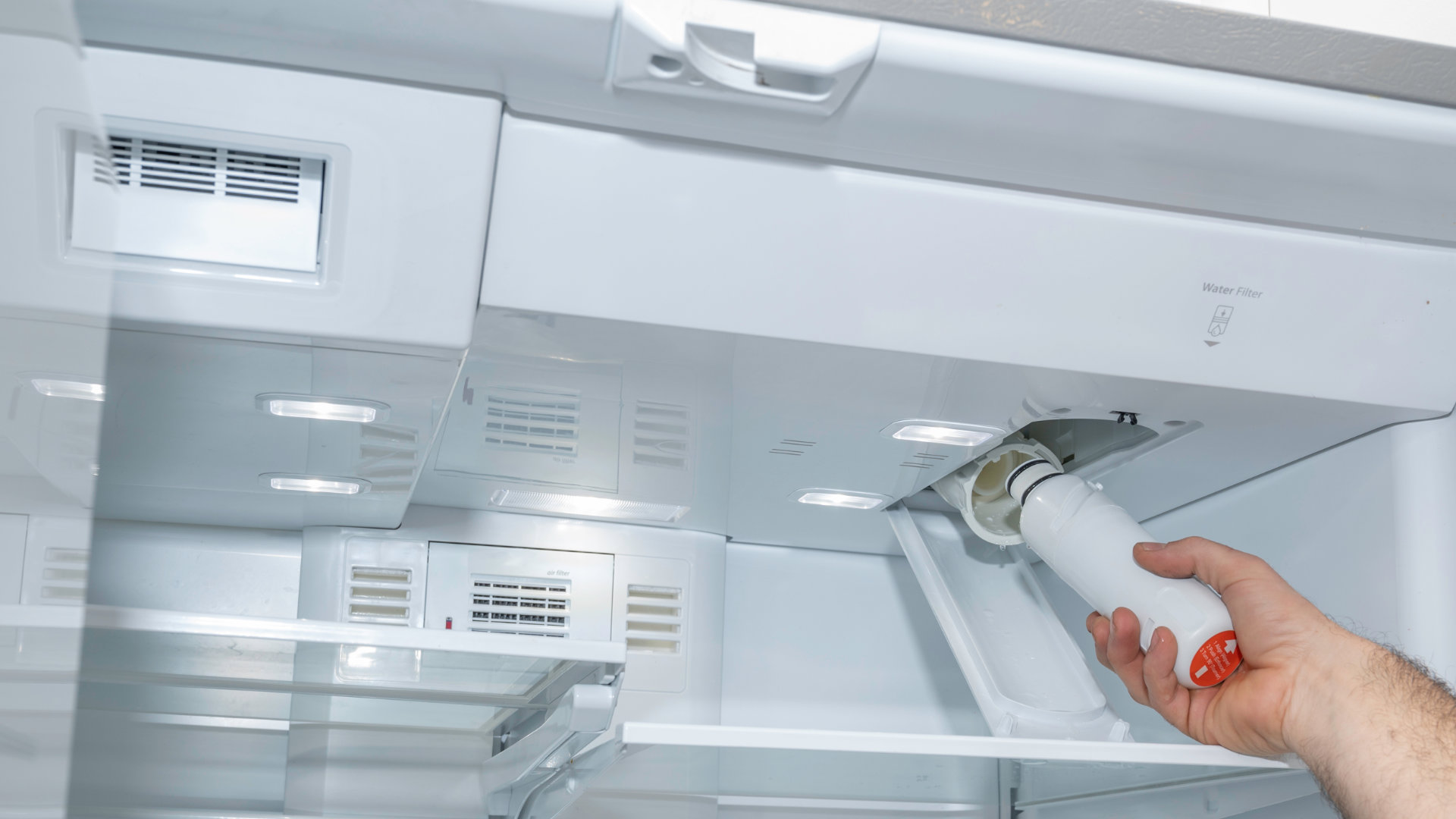
Image Credit: LG
Resetting Refrigerator Filter Alerts
Many refrigerators include filter indicator lights or reminders that must be reset after installing a new filter.
Reset Button Methods
Some models have a dedicated filter reset button that must be pressed and held for several seconds until the indicator light changes or turns off.
Display Panel Reset Instructions
Refrigerators with digital control panels typically allow users to reset the filter alert through the settings or maintenance menu. The process may involve selecting “Water Filter” and confirming the reset.

Samsung 30 cu. ft. French Door Refrigerator RF32CG5900SR | Shop Appliances
Features SmartThings integration that sends notifications when it is time to replace the water filter, along with alerts for temperature changes, open doors, and energy monitoring through the mobile app.

KitchenAid 23.33 cu. ft. French Door Refrigerator KRFC936SPS | Shop Appliances
Includes smart app connectivity that allows users to monitor refrigerator settings remotely and receive notifications when the water filter needs replacement.

JennAir 175690 RISE 54" Stainless Steel Column Refrigerator & Freezer Set | Shop Appliances
Equipped with EveryDrop® filter monitoring technology that provides app based notifications when the water filter requires replacement to help maintain fresh tasting water and ice.

LG 25.5 cu. ft. French Door Refrigerator LRFXC2606S | Shop Appliances
Features advanced digital monitoring systems that help maintain consistent cooling performance, while select smart connected LG refrigerator models also support filter status tracking and maintenance notifications through app connectivity.
These smart refrigerator features help simplify maintenance, improve convenience, and ensure water filtration systems continue operating efficiently with timely filter replacements.
Common Manufacturer Variations
Reset procedures vary by brand and model. Some smart refrigerators automatically detect compatible filters using RFID technology and reset the alert automatically after installation. If the filter warning remains active, consult the refrigerator owner’s manual for manufacturer-specific instructions.
Tips for Extending Filter Life
HVAC and Air Purification Systems
To extend the life and effectiveness of air filters, the sources emphasize proper selection and inspection:
- Ensure a Correct Fit: Using the right size filter, one that fits snugly without being forced, prevents air from bypassing the filter, which keeps the system cleaner and more efficient.
- Remove All Packaging: It is a common mistake to install new filters without fully removing the plastic wrap; this sharply drops airflow and stresses the unit.
- Clean Reusable Components: If your air purifier or HVAC system uses permanent or washable prefilters, cleaning them regularly helps protect the more expensive main filters (like HEPA or carbon) from getting clogged with large debris.
- Inspection Over Timers: Many alerts are just timers, not sensors. If a filter looks clean and airflow is strong upon visual inspection, you may not need to replace it immediately, whereas a filter in a dusty environment might need changing before the timer goes off.
General Maintenance Tips
- Replace According to Environment: While general schedules exist (e.g., quarterly for HVAC or every 10,000km for cabin filters), environmental factors like pets, high-pollen seasons, or living in dusty regions are primary triggers for more frequent maintenance to prevent the system from overworking.
- Seasonal Reminders: A helpful tip for staying on schedule is to replace or inspect all filters at the start of each new season.
- Reset Alerts Properly: Whenever a filter is changed, ensure the indicator light or "Filter Reminder" is reset so the system can accurately track the next cycle based on time or runtime.
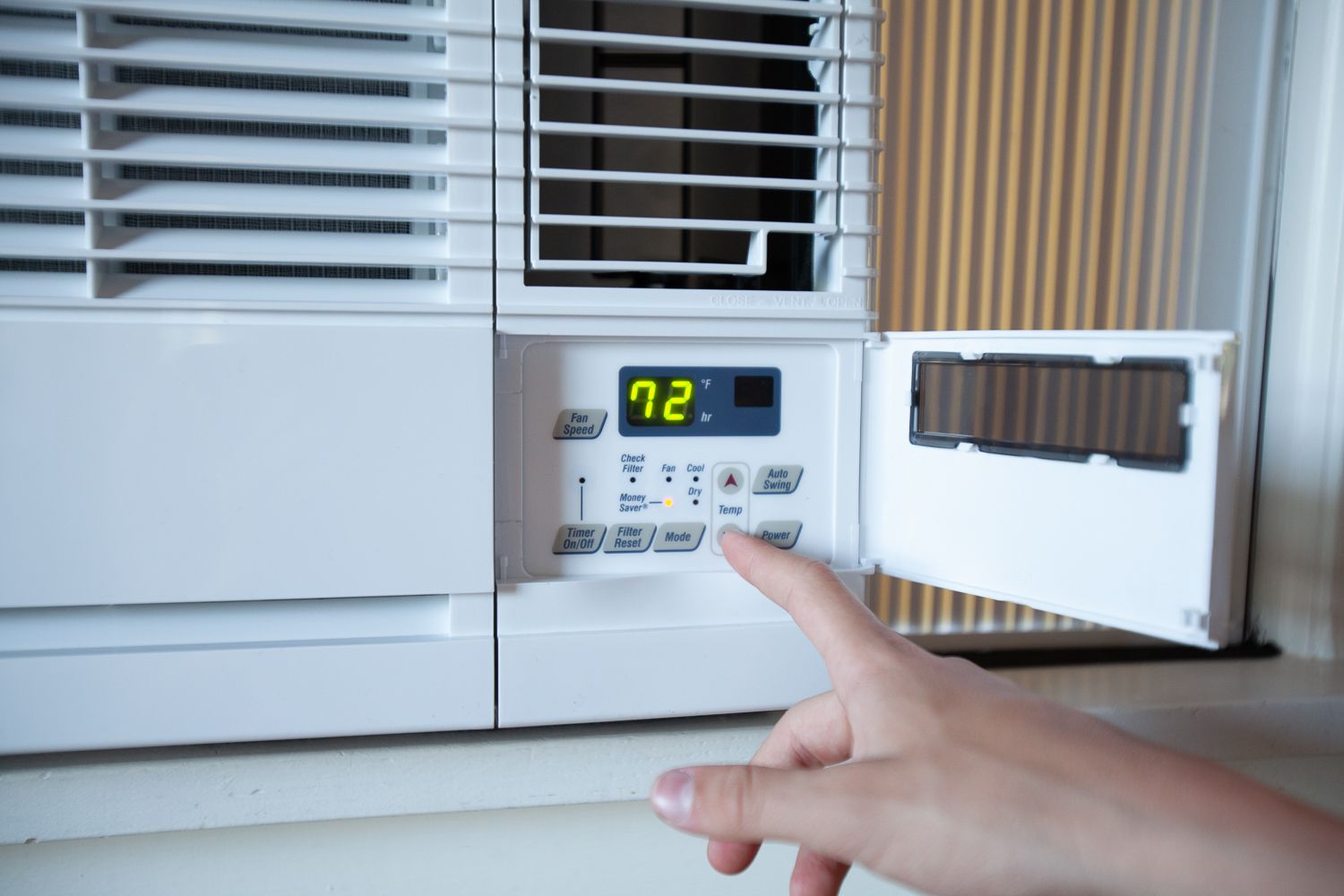
Image Credit: Friedrich
Common Filter Replacement Mistakes to Avoid
Installing the wrong filter size
Ignoring airflow direction arrows
Forgetting to reset filter alerts
Reusing disposable filters
Delaying replacement too long
Choosing the Right Replacement Filters
Understanding Filter Ratings
- MERV ratings for HVAC
- HEPA standards
- OEM vs aftermarket refrigerator filters
Compatibility Tips
- Checking model numbers
- Manufacturer recommendations
Final Thoughts
Regularly replacing and monitoring household filters is a simple maintenance task that can make a major difference in your home’s comfort, efficiency, and overall system performance. Clean HVAC, air purifier, and refrigerator water filters help improve indoor air and water quality, reduce energy consumption, maintain consistent airflow and water flow, and extend the lifespan of essential appliances and equipment. Staying proactive by following replacement schedules, paying attention to filter alerts, and keeping spare filters on hand can help prevent costly repairs and ensure your systems continue operating at their best year round. When it’s time to replace your filters, shop high quality replacement filters and home appliance essentials at ShopAppliances.com to keep your home running cleanly and efficiently.
FAQs
How often should HVAC air filters be replaced?
Most HVAC air filters should be replaced every 1 to 3 months depending on usage, filter type, pets, allergies, and indoor air quality conditions. Homes with pets or heavy HVAC usage may require more frequent replacement.
What happens if I do not replace my air filter?
A dirty or clogged filter can restrict airflow, reduce system efficiency, increase energy costs, lower indoor air quality, and potentially damage HVAC components or appliances over time.
Are filter alerts always accurate?
Not always. Many filter alerts are based on timers rather than actual filter condition. It is still important to visually inspect filters and monitor airflow or water flow for signs of clogging.
How do I know which replacement filter to buy?
Check the existing filter size, model number, or appliance manual before purchasing a replacement. Using the correct size and compatible filter helps maintain proper performance and efficiency.
Can I clean and reuse disposable filters?
No. Disposable HVAC and refrigerator water filters are designed for one time use only. Reusing them can reduce filtration performance and strain the system.
Why is my refrigerator water flow slow after replacing the filter?
Slow water flow may occur if air is trapped in the system or if the filter was not installed correctly. Flush several gallons of water through the dispenser and ensure the filter is securely locked into place.
Do smart thermostats track actual filter usage?
Yes. Many smart thermostats monitor HVAC runtime and provide filter replacement reminders based on how often the heating or cooling system operates rather than fixed calendar dates.
How do I reset a filter alert after replacing the filter?
Most appliances include a reset button or settings option that clears the filter reminder after installation. The exact process varies by manufacturer and model, so consult the owner’s manual if needed.
Can using the wrong filter size damage my system?
Yes. Incorrectly sized filters can allow dust and debris to bypass the filter or restrict airflow, reducing efficiency and potentially causing equipment damage over time.
Where can I buy replacement filters for my appliances?
You can shop for high quality HVAC air filters, refrigerator water filters, and other appliance replacement filters at ShopAppliances.com to help keep your home systems running efficiently.
Read More
How to Maintain Dishwasher Filters and Spray Arms
How to Prevent Odor, Moisture, and Mold in Refrigeration Systems
The Ultimate Guide to Induction Cooktop Care: Cleaning, Repair, and Longevity
How to Care for Panel-Ready Refrigeration (A Complete Maintenance and Preservation Guide)
How to Plan Weather Exposure and Choose the Right Materials for Outdoor Spaces